
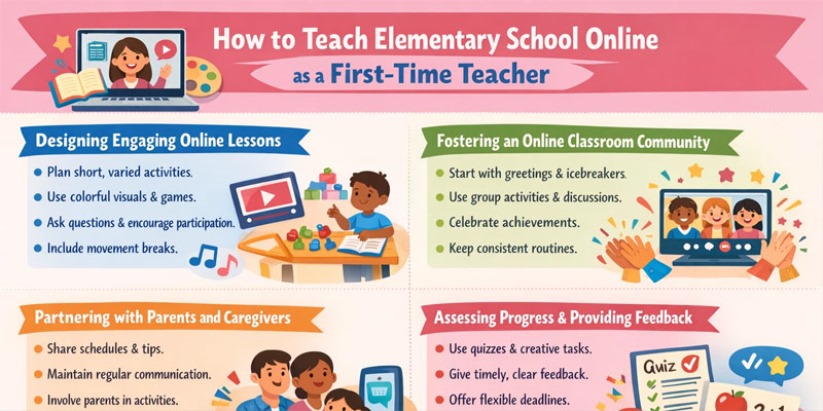
Discover how first-time teachers can build effective online elementary classrooms using clear routines, interactive lessons, and reliable assessment methods.
In the US, many elementary classes now meet remotely, and first-time teachers must adapt to change. Learning how to teach online elementary school effectively involves applying core teaching skills like patience and creativity using digital tools. This article guides new educators on setting up a virtual classroom, planning interactive lessons for young children, building classroom community, involving families, and assessing progress. For new teachers, mastering video conferencing and learning management tools is an essential part of this transition, enabling clear communication. These strategies are grounded in research on online K–12 instruction and aim to replicate the support and structure of a physical classroom as much as possible.
First-time online elementary teachers should start by setting up reliable technology and a clear schedule. They must adapt lesson plans to be brief and engaging, using multimedia and simple activities for young children. Building a supportive online classroom community, often involving parents, is crucial so kids feel connected. Regular formative feedback and quick adjustments help ensure each student stays on track and makes progress.
Setting Up Your Virtual Classroom
Before your first lesson, ensure your technology is reliable. Check that your internet connection is fast, and that your camera, microphone, and lighting are ready for video calls. Pick a user-friendly platform (Zoom or Google Meet for live sessions; Google Classroom or Canvas for assignments). Create a clear schedule or agenda so students (and their parents) know the routine. Research shows that strong teacher training and having needed tech resources are key foundations for success. Setting up a quiet, organized teaching space helps prevent confusion. If live sessions run into trouble, have a backup plan like a pre-recorded lesson or alternative activity. Run a quick practice session so students get familiar with the tools.
Designing Engaging Online Lessons
With young learners, plan short, varied activities. Break lessons into small parts (for instance, a brief video or read-aloud followed by a drawing task or quick game). Use colorful visuals, storytelling, and simple experiments (like counting or sorting toys) to illustrate concepts. Researchers emphasize interactive, hands-on tasks: active learning strategies keep students interested and involved. Keep the lesson easy to follow by using clear titles and simple navigation; a well-organized presentation reduces cognitive load. Encourage participation by asking open-ended questions, using polls, or calling on students by name. Change tone and expressions on camera to sustain attention, and praise all contributions to build confidence. Include short movement breaks or quick songs to refresh energy and focus.
Fostering an Online Classroom Community
Create a warm, social atmosphere even through the screen. Start each session with a friendly greeting and an icebreaker (for example, show a favorite toy or draw together). Allow small-group discussions or paired activities so students interact with classmates. Research stresses building community: teachers should use 'strategies and tools to make classes more interactive' so kids connect socially and 'don't feel isolated' online. Use encouraging body language (smile, nod) and give each child a chance to contribute. Celebrate achievements as a class (for example, virtual applause or stickers). Keep consistent routines (like a daily greeting) so children feel secure. A strong community and routine help young learners feel supported and stay motivated.
Partnering with Parents and Caregivers
In online elementary education, parents often act as co-teachers. Communicate frequently: share daily schedules, expectations, and tips. Johnson emphasizes that for young children 'teachers need parents' partnership to make sure students are set up to be successful' (with routines and minimized distractions). Use emails, class websites, or messaging tools to send updates and instructions. Invite parents to join occasional video lessons or virtual events to stay involved. Even quick texts about a student's progress can be more effective than a formal report. Encourage parents to help their child practice the login routine and keep up with the schedule. By keeping communication frequent and clear, teachers and families form a team that supports each child's success.
Assessing Progress and Providing Feedback
Regularly check what students understand. Use short quizzes, polls, or creative tasks (for example, asking a student to draw an answer) to gauge learning. Choose kid-friendly tools (for example, Google Forms or Wayground) and include images or audio to engage young learners. Allow extra time or flexible deadlines if technical problems arise. Give feedback promptly and clearly — experts advise feedback as soon as possible (within a few days) and at least weekly so students know if they're on track. Make comments specific: point out what was done well and gently correct mistakes. For very young children, you can allow answers by drawing or speaking when typing is hard, and always emphasize effort to keep them motivated.
Comparison of Online Teaching Platforms
Platform | Key Strengths | Considerations |
Zoom / Google Meet | Live video conferencing with screen sharing and breakout rooms. | Requires stable internet; young children may need supervision. |
Google Classroom | Free LMS for assignments and class management. | Mainly asynchronous; less real-time interaction. |
Seesaw | Student-friendly platform with portfolios and activities. | Geared toward elementary; fewer advanced features. |
Microsoft Teams | Integrated chat, video, and Office 365 tools. | Can be complex for very young students. |
Kahoot!/Wayground | Game-based quizzes for engagement and review. | Fun for recall practice; needs teacher guidance. |
Moving Forward With Confidence in Online Elementary Classrooms
Teaching elementary school online as a first-time teacher is challenging but achievable with preparation. Begin with reliable technology, clear schedules, and a friendly virtual classroom environment. Plan interactive, short lessons and use visuals to capture kids' imaginations. Foster an online community, partner closely with parents, and use timely feedback so each child stays on track. Mistakes will happen; be flexible and learn from each session. Experts remind us that many teaching principles still apply: 'you still have to be patient, [and] find multiple ways of presenting the content'. With these strategies, a new teacher can confidently guide young students to succeed in an online learning environment.