
So, you've reached that point. Your project is outgrowing the 'shared' sandbox, or maybe your current cloud setup is eating your budget faster than a teenager at a buffet.
You need your own machine. A real, physical, heavy-duty server that doesn't share its CPU cycles with anyone else.
But then you look at the price tags. One provider wants $50 a month; another wants $850. It's the same "box," right?Well, not exactly.
Renting a physical server is a lot like buying a car. Both have four wheels and an engine, but a 1998 hatchback and a brand-new Turbo-S offer "slightly" different experiences. Today, I'm going to pull back the curtain on server pricing. We'll look at the nuts, the bolts, and the hidden cables that determine whether you're getting a bargain or a lemon.
Let's dive in.
1. The Brains of the Operation: CPU Power
When you rent a dedicated server, theProcessor (CPU) is the single biggest line item on your bill. It's the engine under the hood.
If you're running a simple website with moderate traffic, an entry-levelIntel Xeon E-series or aRyzen might cost you the price of a nice dinner. But if you're crunching massive datasets or running high-load databases, you're looking atdual Gold Scalable Xeons orAMD EPYC monsters.
Why the massive price gap?
Core Count: More cores mean more simultaneous "workers." A 4-core CPU is a small team; a 64-core CPU is a literal army.
Clock Speed: How fast can one worker think? High-frequency CPUs are essential for gaming or high-frequency trading, and they command a premium.
Generation: Last year's tech is always cheaper. You can get a "legacy" server for a steal, but it'll be less power-efficient and potentially slower.
Think of it like this: You wouldn't hire a world-class neurosurgeon to flip burgers. If your task is simple, don't pay for the "Ivy League" silicon.
2. RAM: Your Server's Short-Term Memory
If the CPU is the brain,RAM is the size of the desk the brain works on. If the desk is too small, the brain has to keep getting up to fetch files from the filing cabinet (the hard drive), which slows everything down to a crawl.
Standard builds: Usually start at 16GB or 32GB.
Enterprise builds: Can go up to 512GB or even several Terabytes.
The catch? RAM is expensive to buy and expensive to replace. Many providers charge a flat monthly fee for every 16GB increment. If you're runningVirtual Desktop Infrastructure (VDI) or massiveSQL databases, this is where your bill starts to climb.
3. Storage: Speed vs. Space
This is where I see people make the most mistakes. They see "2TB" and think, "Great!" without checking the technology behind it.
HDD (Hard Disk Drives): The old-school spinning platters. They are cheap and offer massive capacity. Perfect for backups or "cold" storage where speed doesn't matter.
SSD (SATA): Much faster, much more reliable, and now the industry standard for general use.
NVMe: The "teleportation" of storage. These drives are plugged directly into the motherboard's high-speed lanes. If your site needs to load in milliseconds,NVMe is your best friend.
4. The "Unseen" Cost: Traffic and Port Speed
Let's talk about the "Internet pipe." You can have the fastest server in the world, but if it's connected to the web via a "drinking straw," it's useless.
Port Speed Most servers come with a1 Gbps port. Some budget providers might limit you to 100 Mbps (stay away from those for modern apps!). High-end providers offer 10 Gbps or even 25 Gbps ports for big data streaming.
Bandwidth (Traffic)
Limited: You get, say, 10TB or 30TB a month. Go over, and they'll bill you per GB. This is the "cell phone data plan" model.
Unmetered: You pay for the pipe size, and you can push data through it 24/7 without extra fees.
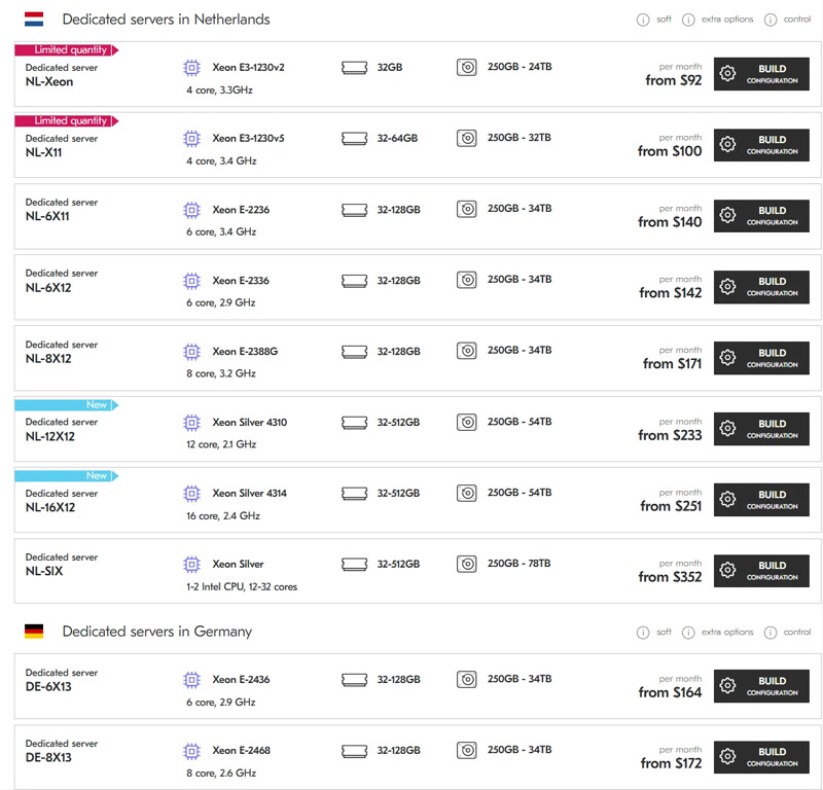
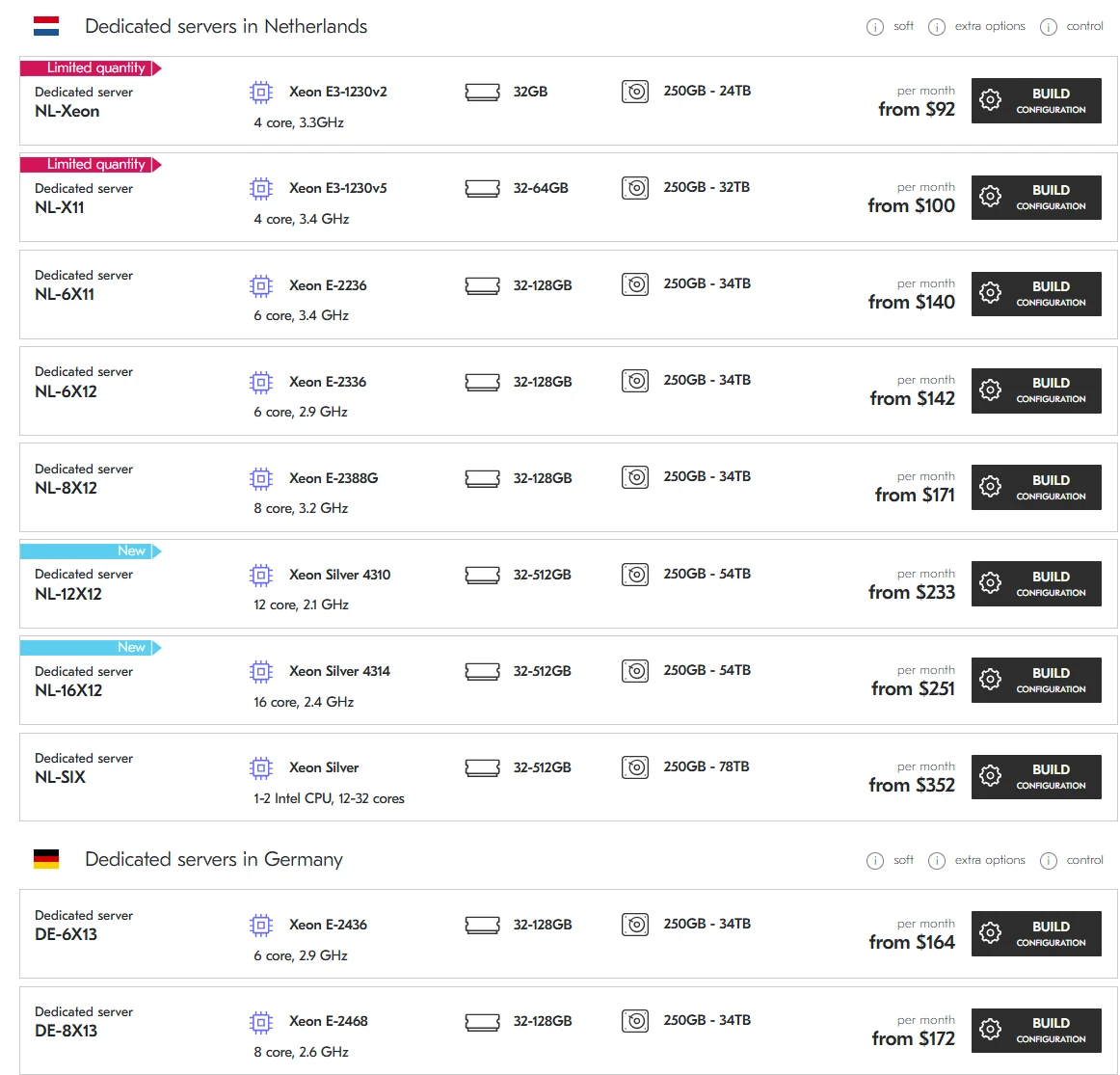
The picture from Deltahost
5. Location, Location, Location
Where is the server physically sitting? This affects the price more than you'd think.
USA and Europe (Germany, Netherlands): Usually the cheapest. These areas have massive "server farms" and cheap, competitive electricity.
Asia or South America: Generally more expensive. Bandwidth costs in places like Vietnam, Singapore, or Brazil can be 3x to 5x higher than in London or New York.
Personal Insight: If your users are in Europe, don't rent a server in Singapore just because it looks "cool." Thelatency (ping) will kill your user experience. Always place the metal as close to the human as possible.
6. The Management Tax: "Do It For Me"
This is the "emotional" part of the bill.
Unmanaged: You get the IP address, a username, and a password. If the software breaks, it's your problem. This is the cheapest option.
Managed: The provider handles updates, security patches, backups, and monitoring.
A Moment of Truth: > I've seen developers try to save $100 by going unmanaged, only to lose three days of sleep (and thousands in revenue) when a kernel update goes sideways at 3 AM. If you aren't a Linux wizard,pay for the management. It's not an "expense"; it's "stress insurance."
7. The Emotional Reality of "Going Bare Metal"
Let's get real for a second. There is something incredibly satisfying—and terrifying—about knowing a specific piece of hardware in a rack somewhere in Amsterdam belongsonly to you.
When you use a shared VPS, you're living in an apartment building. You hear the neighbors (noisy neighbors effect), you share the plumbing, and if someone starts a fire, the whole building gets smoky.
When you rent a physical server,you own the house. You can play your music as loud as you want (max out that CPU!). You can renovate the kitchen (custom OS kernels). But if a pipe bursts (a hard drive dies), you are the one who has to call the plumber.
Yes, it costs more. But thepeace of mind knowing that another user's viral "cat video" won't slow down your enterprise database? That is worth every penny. It's the difference between feeling like a "guest" on the internet and feeling like a "landlord."
8. Putting the Numbers Together: What's the Total?
So, what is the bottom line?
Entry Level ($50–$90/mo): Older CPU (Xeon E3/E5), 16GB RAM, 2x HDD or 500GB SSD, 1Gbps port with 10TB traffic. Great for small projects or VPNs.
Mid-Range ($120–$250/mo): Modern Ryzen or Xeon Silver, 64GB-128GB RAM, NVMe storage, unmetered bandwidth. The "sweet spot" for 90% of businesses.
High-End ($400–$1,000+/mo): Dual EPYC/Xeon Gold, 256GB+ RAM, massive RAID-10 NVMe arrays, 10Gbps dedicated ports. This is for the "big boys"—heavy AI processing, massive gaming clusters, or high-volume SaaS.
Summary and The Verdict
Renting a physical server- https://deltahost.com/dedicated.html - isn't just about "buying parts." You are paying forreliability, power, and the freedom to scale.
Before you click "Buy," ask yourself these three questions:
Do I need the speed or the space? (NVMe vs. HDD)
Is my traffic predictable? (Limited vs. Unmetered)
Do I have the skills to fix it? (Unmanaged vs. Managed)
My final piece of advice? Don't overbuy on day one, but don't "cheap out" on your foundation. A server is the bedrock of your digital business. If the bedrock is shaky, everything you build on top will eventually crack.
Ready to make the jump? Go for it! There's nothing quite like the raw power of dedicated silicon at your fingertips. If you need help picking a specific config or a provider that won't disappear overnight, feel free to reach out. I've been through the "server trenches" more times than I can count, and I'm always happy to help a fellow builder avoid the pitfalls.
Good luck, and happy hosting!